
Experiment Tracking Changes Everything
From MLflow to Production: Building Reproducible ML Pipelines with Comprehensive Experiment Management

Welcome back to Data In Production. Last week, we discussed Cloud Cost Optimisation Techniques No One Talks About. Today we’ll deep dive into Experiment Tracking and it’s techniques. Every ML team I have worked with started the same way: training models in Jupyter notebooks, saving weights to local directories with names like model_v2_final_FINAL.pkl, and trying to remember which hyperparameters produced which results. It works until it does not.
The breaking point usually comes when someone asks "can we reproduce the model we deployed six months ago?" and the answer is a uncomfortable silence followed by frantic git archaeology.
After implementing experiment tracking across four organizations, I have seen it transform ML development from art to engineering. Today we will cover the complete journey from basic MLflow setup to production grade experiment management.
We’ll discuss:
The experiment tracking mindset: why notebooks are not enough and what proper tracking enables
MLflow fundamentals: tracking experiments, parameters, metrics, and artifacts with production patterns
Model registry: versioning, staging, and deployment workflows that scale
Comparison and analysis: finding the best model systematically, not by intuition
Integration patterns: connecting experiment tracking to your existing ML infrastructure
Advanced patterns: distributed training, hyperparameter optimization, and custom metrics
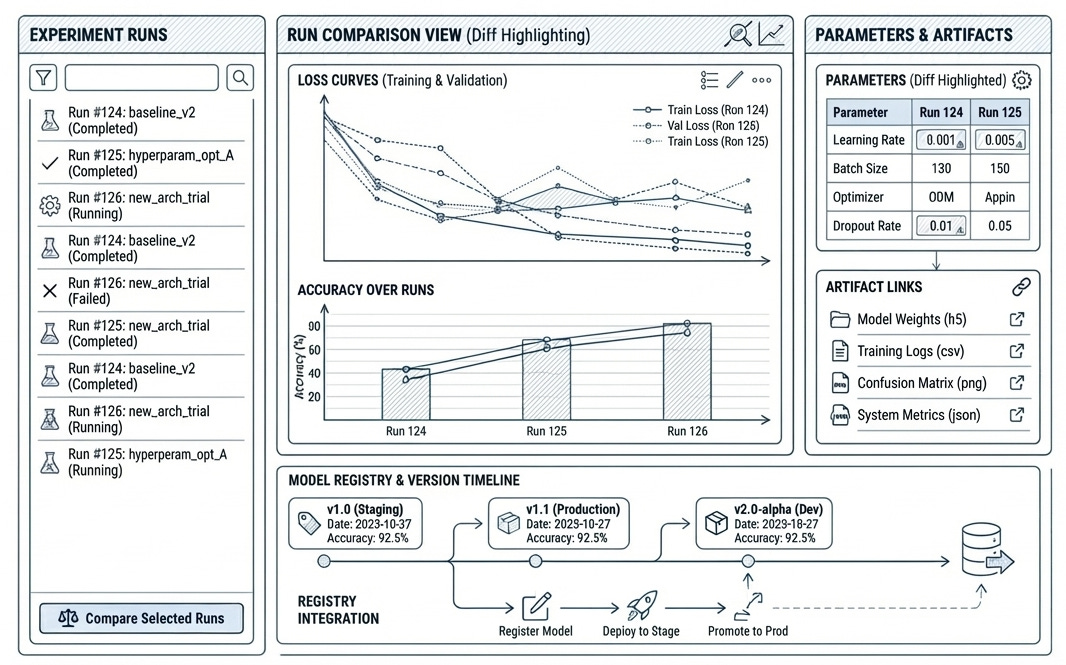
1. The Experiment Tracking Mindset
Experiment tracking is not just logging. It is building a complete record of every decision that led to a model: the data it saw, the code that processed it, the hyperparameters that shaped it, and the metrics that evaluated it.
What Proper Tracking Enables
Reproducibility: Given any deployed model, you can recreate the exact training environment, data version, and code that produced it.
Comparison: Instead of relying on memory or scattered notes, you can systematically compare hundreds of experiments across multiple dimensions.
Collaboration: Team members can build on each others work without starting from scratch or duplicating effort.
Debugging: When a model degrades in production, you can trace back to understand what changed.
Compliance: For regulated industries, experiment tracking provides the audit trail that proves your model development process.
2. MLflow Fundamentals: Production Patterns
MLflow has become the de facto standard for experiment tracking, and for good reason. It is open source, framework agnostic, and scales from single experiments to enterprise deployments. Here is how to use it properly.
MLflow Setup for Production
First, let us set up MLflow with a proper backend store and artifact location. The key is separating experiment metadata (stored in a database) from artifacts (stored in object storage).
# MLflow Production Setup
# Docker Compose for MLflow with PostgreSQL and MinIO

services:
  postgres:
    image: postgres:16
    environment:
      POSTGRES_USER: mlflow
      POSTGRES_PASSWORD: mlflow_secure_password
      POSTGRES_DB: mlflow
    volumes:
      - postgres_data:/var/lib/postgresql/data
    healthcheck:
      test: ["CMD", "pg_isready", "-U", "mlflow"]
      interval: 5s
      retries: 5

  minio:
    image: minio/minio:latest
    command: server /data --console-address ":9001"
    environment:
      MINIO_ROOT_USER: mlflow
      MINIO_ROOT_PASSWORD: mlflow_secure_password
    volumes:
      - minio_data:/data
    ports:
      - "9000:9000"
      - "9001:9001"

  mlflow:
    image: ghcr.io/mlflow/mlflow:2.15.0
    depends_on:
      postgres:
        condition: service_healthy
    environment:
      MLFLOW_BACKEND_STORE_URI: postgresql://mlflow:mlflow@postgres:5432/mlflow
      MLFLOW_ARTIFACT_ROOT: s3://mlflow-artifacts
      AWS_ACCESS_KEY_ID: mlflow
      AWS_SECRET_ACCESS_KEY: mlflow_secure_password
      MLFLOW_S3_ENDPOINT_URL: http://minio:9000
    ports:
      - "5000:5000"
    command: >
      mlflow server
      --host 0.0.0.0
      --port 5000
      --backend-store-uri postgresql://mlflow:mlflow@postgres:5432/mlflow
      --default-artifact-root s3://mlflow-artifacts

volumes:
  postgres_data:
  minio_data:
Comprehensive Experiment Tracking
Here is a production grade experiment tracking class that captures everything you need for reproducibility:
# Production Experiment Tracking with MLflow 2.15
import mlflow
from mlflow.tracking import MlflowClient
import hashlib
from datetime import datetime
from typing import Dict, Any, Optional
from dataclasses import dataclass, asdict
import git
import platform

@dataclass
class DatasetInfo:
    name: str
    version: str
    path: str
    row_count: int
    column_count: int
    hash: str
    created_at: str

class ExperimentTracker:
    """Production grade experiment tracking with MLflow."""

    def __init__(
        self,
        experiment_name: str,
        tracking_uri: str = "http://localhost:5000"
    ):
        mlflow.set_tracking_uri(tracking_uri)
        self.client = MlflowClient()

        experiment = mlflow.get_experiment_by_name(experiment_name)
        if experiment is None:
            self.experiment_id = mlflow.create_experiment(experiment_name)
        else:
            self.experiment_id = experiment.experiment_id

        mlflow.set_experiment(experiment_name)
        self.run = None

    def start_run(self, run_name: Optional[str] = None, tags: Optional[Dict] = None):
        """Start a new tracked run with environment capture."""
        self.run = mlflow.start_run(run_name=run_name)
        self._log_environment()
        self._log_git_info()
        if tags:
            mlflow.set_tags(tags)
        return self.run

    def _log_environment(self):
        """Capture Python environment for reproducibility."""
        mlflow.set_tags({
            "env.python_version": platform.python_version(),
            "env.platform": platform.platform()
        })

    def _log_git_info(self):
        """Capture git commit for code versioning."""
        try:
            repo = git.Repo(search_parent_directories=True)
            mlflow.set_tags({
                "git.commit": repo.head.commit.hexsha,
                "git.branch": repo.active_branch.name,
                "git.dirty": str(repo.is_dirty())
            })
        except git.InvalidGitRepositoryError:
            mlflow.set_tag("git.available", "false")

    def log_dataset(self, df, name: str, version: str = "1.0") -> DatasetInfo:
        """Log dataset with provenance information."""
        data_hash = hashlib.md5(str(df.values.tobytes()).encode()).hexdigest()[:12]

        info = DatasetInfo(
            name=name, version=version, path=f"datasets/{name}",
            row_count=len(df), column_count=len(df.columns),
            hash=data_hash, created_at=datetime.now().isoformat()
        )

        mlflow.log_dict(asdict(info), f"datasets/{name}_info.json")
        mlflow.set_tags({
            f"dataset.{name}.rows": str(info.row_count),
            f"dataset.{name}.hash": info.hash
        })
        return info

    def log_params(self, params: Dict[str, Any]):
        """Log hyperparameters with nested dict support."""
        flat_params = self._flatten_dict(params)
        mlflow.log_params(flat_params)

    def log_metrics(self, metrics: Dict[str, float], step: Optional[int] = None):
        """Log metrics at specific step."""
        mlflow.log_metrics(metrics, step=step)

    def log_model(self, model, artifact_path: str, registered_name: Optional[str] = None):
        """Log model with optional registration."""
        mlflow.sklearn.log_model(model, artifact_path, registered_model_name=registered_name)

    def end_run(self, status: str = "FINISHED"):
        mlflow.end_run(status=status)
        self.run = None

    def _flatten_dict(self, d: Dict, parent_key: str = "", sep: str = ".") -> Dict:
        items = []
        for k, v in d.items():
            new_key = f"{parent_key}{sep}{k}" if parent_key else k
            if isinstance(v, dict):
                items.extend(self._flatten_dict(v, new_key, sep).items())
            else:
                items.append((new_key, v))
        return dict(items)
3. Model Registry: Versioning and Deployment
The model registry transforms experiment tracking from a logging system into a deployment pipeline. It provides versioning, staging, and approval workflows that connect training to production.
Model Lifecycle Stages
MLflow defines four stages for models: None (newly registered), Staging (ready for testing), Production (serving traffic), and Archived (deprecated). Here is how to manage transitions programmatically:
# Model Registry Management (MLflow 2.15)
from mlflow.tracking import MlflowClient
from typing import Optional, List, Dict
from datetime import datetime

class ModelRegistryManager:
    """Manage model lifecycle in MLflow Model Registry."""

    def __init__(self, tracking_uri: str = "http://localhost:5000"):
        self.client = MlflowClient(tracking_uri=tracking_uri)

    def register_model(
        self,
        run_id: str,
        model_path: str,
        model_name: str,
        description: Optional[str] = None
    ) -> str:
        """Register a model from an experiment run."""
        model_uri = f"runs:/{run_id}/{model_path}"

        # Register the model
        result = self.client.create_model_version(
            name=model_name,
            source=model_uri,
            run_id=run_id,
            description=description
        )

        return result.version

    def promote_to_staging(
        self,
        model_name: str,
        version: str,
        validation_metrics: Dict[str, float]
    ) -> bool:
        """Promote model to staging after validation."""
        # Check validation thresholds
        required_metrics = {
            "accuracy": 0.85,
            "f1_score": 0.80
        }

        for metric, threshold in required_metrics.items():
            if validation_metrics.get(metric, 0) < threshold:
                print(f"Validation failed: {metric} below threshold")
                return False

        # Transition to staging
        self.client.transition_model_version_stage(
            name=model_name,
            version=version,
            stage="Staging",
            archive_existing_versions=False
        )

        # Add validation metadata
        self.client.set_model_version_tag(
            name=model_name,
            version=version,
            key="validation.passed",
            value="true"
        )

        return True

    def promote_to_production(
        self,
        model_name: str,
        version: str,
        approval_user: str
    ) -> bool:
        """Promote model to production with approval."""
        # Archive current production version
        prod_versions = self.client.get_latest_versions(
            model_name, stages=["Production"]
        )
        for v in prod_versions:
            self.client.transition_model_version_stage(
                name=model_name,
                version=v.version,
                stage="Archived"
            )

        # Promote new version
        self.client.transition_model_version_stage(
            name=model_name,
            version=version,
            stage="Production"
        )

        # Record approval
        self.client.set_model_version_tag(
            name=model_name,
            version=version,
            key="approval.user",
            value=approval_user
        )
        self.client.set_model_version_tag(
            name=model_name,
            version=version,
            key="approval.timestamp",
            value=datetime.now().isoformat()
        )

        return True

    def get_production_model(self, model_name: str):
        """Load the current production model."""
        import mlflow.pyfunc

        model_uri = f"models:/{model_name}/Production"
        return mlflow.pyfunc.load_model(model_uri)

    def compare_versions(
        self,
        model_name: str,
        versions: List[str]
    ) -> Dict:
        """Compare metrics across model versions."""
        comparison = {}

        for version in versions:
            mv = self.client.get_model_version(model_name, version)
            run = self.client.get_run(mv.run_id)
            comparison[version] = {
                "metrics": run.data.metrics,
                "params": run.data.params,
                "created_at": mv.creation_timestamp
            }

        return comparison
4. Experiment Comparison and Analysis
With hundreds of experiments logged, finding the best model requires systematic comparison. Here is a comprehensive analysis framework:
# Experiment Analysis and Comparison
import mlflow
from mlflow.tracking import MlflowClient
import pandas as pd
from typing import List, Dict, Optional
import matplotlib.pyplot as plt

class ExperimentAnalyzer:
    """Analyze and compare experiments systematically."""

    def __init__(self, tracking_uri: str = "http://localhost:5000"):
        mlflow.set_tracking_uri(tracking_uri)
        self.client = MlflowClient()

    def get_experiment_runs(
        self,
        experiment_name: str,
        filter_string: Optional[str] = None,
        max_results: int = 1000
    ) -> pd.DataFrame:
        """Get all runs from an experiment as a DataFrame."""
        experiment = mlflow.get_experiment_by_name(experiment_name)

        runs = mlflow.search_runs(
            experiment_ids=[experiment.experiment_id],
            filter_string=filter_string,
            max_results=max_results
        )

        return runs

    def find_best_model(
        self,
        experiment_name: str,
        metric: str,
        ascending: bool = False
    ) -> Dict:
        """Find the best performing model by a specific metric."""
        runs = self.get_experiment_runs(experiment_name)

        metric_col = f"metrics.{metric}"
        if metric_col not in runs.columns:
            raise ValueError(f"Metric {metric} not found")

        runs_sorted = runs.sort_values(metric_col, ascending=ascending)
        best_run = runs_sorted.iloc[0]

        return {
            "run_id": best_run["run_id"],
            "metric_value": best_run[metric_col],
            "params": {k.replace("params.", ""): v
                      for k, v in best_run.items() if k.startswith("params.")},
            "all_metrics": {k.replace("metrics.", ""): v
                          for k, v in best_run.items() if k.startswith("metrics.")}
        }

    def compare_models(
        self,
        experiment_name: str,
        metrics: List[str],
        group_by: Optional[str] = None
    ) -> pd.DataFrame:
        """Compare models across multiple metrics."""
        runs = self.get_experiment_runs(experiment_name)

        metric_cols = [f"metrics.{m}" for m in metrics]
        cols = ["run_id", "tags.mlflow.runName"] + metric_cols

        if group_by:
            cols.append(f"params.{group_by}")

        comparison = runs[cols].copy()
        comparison.columns = [c.split(".")[-1] for c in comparison.columns]

        return comparison

    def plot_metric_history(
        self,
        run_id: str,
        metric: str
    ) -> plt.Figure:
        """Plot metric history over training steps."""
        history = self.client.get_metric_history(run_id, metric)

        steps = [h.step for h in history]
        values = [h.value for h in history]

        fig, ax = plt.subplots(figsize=(10, 6))
        ax.plot(steps, values, marker="o")
        ax.set_xlabel("Step")
        ax.set_ylabel(metric)
        ax.set_title(f"{metric} over training")
        ax.grid(True)

        return fig

    def hyperparameter_importance(
        self,
        experiment_name: str,
        target_metric: str,
        params: List[str]
    ) -> pd.DataFrame:
        """Analyze which hyperparameters most impact the target metric."""
        runs = self.get_experiment_runs(experiment_name)

        param_cols = [f"params.{p}" for p in params]
        metric_col = f"metrics.{target_metric}"

        # Calculate correlation between params and metric
        correlations = {}
        for param in param_cols:
            if param in runs.columns:
                # Convert to numeric if possible
                numeric_param = pd.to_numeric(runs[param], errors="coerce")
                if not numeric_param.isna().all():
                    corr = numeric_param.corr(runs[metric_col])
                    correlations[param.replace("params.", "")] = corr

        return pd.DataFrame({
            "parameter": list(correlations.keys()),
            "correlation": list(correlations.values())
        }).sort_values("correlation", key=abs, ascending=False)


# Usage Example
analyzer = ExperimentAnalyzer()

# Find best model
best = analyzer.find_best_model(
    experiment_name="customer_churn_prediction",
    metric="f1_score",
    ascending=False
)
print(f"Best run: {best['run_id']}, F1: {best['metric_value']:.4f}")

# Compare across metrics
comparison = analyzer.compare_models(
    experiment_name="customer_churn_prediction",
    metrics=["accuracy", "f1_score", "precision", "recall"],
    group_by="model.type"
)
print(comparison.head(10))
5. Integration Patterns
Experiment tracking becomes powerful when integrated with your existing infrastructure. Here are patterns for common integrations:
Airflow Integration
Track experiments triggered by Airflow DAGs with automatic context propagation:
# Airflow MLflow Integration (Airflow 2.9+)
from airflow import DAG
from airflow.operators.python import PythonOperator
from airflow.models import Variable
from datetime import datetime, timedelta
import mlflow

def train_model_with_tracking(**context):
    """Training task with MLflow tracking."""
    import mlflow
    from sklearn.ensemble import RandomForestClassifier
    from sklearn.metrics import accuracy_score, f1_score
    import pandas as pd

    # Get Airflow context
    dag_id = context["dag"].dag_id
    task_id = context["task"].task_id
    run_id = context["run_id"]
    execution_date = context["execution_date"].isoformat()

    # Configure MLflow
    mlflow.set_tracking_uri(Variable.get("mlflow_tracking_uri"))
    mlflow.set_experiment(f"airflow_{dag_id}")

    with mlflow.start_run(run_name=f"{task_id}_{execution_date[:10]}"):
        # Log Airflow context
        mlflow.set_tags({
            "airflow.dag_id": dag_id,
            "airflow.task_id": task_id,
            "airflow.run_id": run_id,
            "airflow.execution_date": execution_date
        })

        # Get params from Airflow
        params = context["params"]
        mlflow.log_params(params)

        # Training logic
        df = pd.read_parquet(params["data_path"])
        X = df.drop("target", axis=1)
        y = df["target"]

        model = RandomForestClassifier(
            n_estimators=params.get("n_estimators", 100),
            max_depth=params.get("max_depth", 10)
        )
        model.fit(X, y)

        # Log metrics
        y_pred = model.predict(X)
        mlflow.log_metrics({
            "accuracy": accuracy_score(y, y_pred),
            "f1_score": f1_score(y, y_pred)
        })

        # Log model
        mlflow.sklearn.log_model(model, "model")

        # Pass run_id to downstream tasks via XCom
        return mlflow.active_run().info.run_id


# DAG Definition
default_args = {
    "owner": "ml-team",
    "retries": 2,
    "retry_delay": timedelta(minutes=5)
}

with DAG(
    dag_id="ml_training_pipeline",
    default_args=default_args,
    schedule_interval="@daily",
    start_date=datetime(2026, 1, 1),
    catchup=False
) as dag:

    train_task = PythonOperator(
        task_id="train_model",
        python_callable=train_model_with_tracking,
        params={
            "data_path": "s3://bucket/features/daily/",
            "n_estimators": 100,
            "max_depth": 10
        }
    )
6. Advanced Patterns
Hyperparameter Optimization with Optuna
Integrate hyperparameter optimization with automatic experiment logging:
# Optuna + MLflow Hyperparameter Optimization (2026)
import optuna
from optuna.integration.mlflow import MLflowCallback
import mlflow
from sklearn.ensemble import GradientBoostingClassifier
from sklearn.model_selection import cross_val_score
import pandas as pd

def objective(trial, X, y):
    """Optuna objective with MLflow tracking."""

    # Define hyperparameter search space
    params = {
        "n_estimators": trial.suggest_int("n_estimators", 50, 500),
        "max_depth": trial.suggest_int("max_depth", 3, 15),
        "learning_rate": trial.suggest_float("learning_rate", 0.01, 0.3, log=True),
        "min_samples_split": trial.suggest_int("min_samples_split", 2, 20),
        "min_samples_leaf": trial.suggest_int("min_samples_leaf", 1, 10),
        "subsample": trial.suggest_float("subsample", 0.6, 1.0)
    }

    # Train with cross validation
    model = GradientBoostingClassifier(**params, random_state=42)
    scores = cross_val_score(model, X, y, cv=5, scoring="f1")

    return scores.mean()


def run_hyperparameter_search(
    X: pd.DataFrame,
    y: pd.Series,
    n_trials: int = 100,
    experiment_name: str = "hyperparameter_search"
):
    """Run Optuna study with MLflow tracking."""

    mlflow.set_experiment(experiment_name)

    # Create MLflow callback for automatic logging
    mlflow_callback = MLflowCallback(
        tracking_uri=mlflow.get_tracking_uri(),
        metric_name="f1_score",
        create_experiment=False
    )

    # Create Optuna study
    study = optuna.create_study(
        direction="maximize",
        study_name=f"{experiment_name}_study",
        sampler=optuna.samplers.TPESampler(seed=42),
        pruner=optuna.pruners.MedianPruner(n_warmup_steps=10)
    )

    # Run optimization
    study.optimize(
        lambda trial: objective(trial, X, y),
        n_trials=n_trials,
        callbacks=[mlflow_callback],
        show_progress_bar=True
    )

    # Log best results in a summary run
    with mlflow.start_run(run_name="optimization_summary"):
        mlflow.log_params(study.best_params)
        mlflow.log_metrics({
            "best_f1_score": study.best_value,
            "n_trials": len(study.trials)
        })

        # Train final model with best params
        best_model = GradientBoostingClassifier(
            **study.best_params, random_state=42
        )
        best_model.fit(X, y)
        mlflow.sklearn.log_model(
            best_model, "best_model",
            registered_model_name=f"{experiment_name}_best"
        )

    return study.best_params, study.best_value


# Usage
df = pd.read_parquet("training_data.parquet")
X = df.drop("target", axis=1)
y = df["target"]

best_params, best_score = run_hyperparameter_search(
    X, y,
    n_trials=100,
    experiment_name="churn_model_optimization"
)
print(f"Best F1: {best_score:.4f}")
print(f"Best params: {best_params}")
TLDR
Experiment tracking transforms ML development from an art into engineering. Here is what matters most:
Track everything from day one: The cost of adding tracking later is exponentially higher than starting with it. Even simple experiments benefit from proper logging.
Automate environment capture: Git commits, Python versions, and package dependencies should be logged automatically. Manual documentation is incomplete documentation.
Use the model registry: Do not deploy models by copying files. Use staging environments, version tracking, and approval workflows that create audit trails.
Make comparison easy: If comparing experiments requires custom scripts every time, you will stop doing it. Invest in tooling that makes systematic comparison the default.
Integrate with existing workflows: Experiment tracking should enhance your current tools (Airflow, CI/CD, notebooks), not replace them. Good integrations multiply value.
Plan for scale: What works for 10 experiments breaks at 10,000. Use proper backends (PostgreSQL, not SQLite) and artifact storage (S3, not local disk) from the start.
The teams that excel at ML are not necessarily the ones with the most sophisticated algorithms. They are the ones who can reliably reproduce results, systematically improve models, and confidently deploy to production. Experiment tracking is the foundation that makes all of this possible.
Next, we will explore why batch processing is not going away, despite all the hype around real time streaming.